Achieving tangible outcomes from training programs requires consistent monitoring, adaptation, and evaluation of training initiatives. This is where xAPI can be an invaluable tool for learning and training creators.
In this article, we discuss the basics of xAPI, the interactions that can be captured by this learning protocol and how you can leverage xAPI data to drive insights on how to improve and grow your training program.
What is xAPI?
xAPI, which stands for Experience API and is also known as Tin-Can, is a specification for tracking and reporting learning experiences in a digital format. It is designed to capture and store data about a wide range of learning activities and experiences, both online and offline.
xAPI uses a simple statement structure to record learning experiences. Each statement consists of a subject (who), a verb (what), and an object (the target of the verb). Unlike other e-learning standards like SCORM that are limited to a single eLearning course in your learning management system (LMS), xAPI can track a wide variety of learning experiences, including online courses, simulations, offline activities and mobile learning.
How does xAPI work?
xAPI works by capturing learning experiences, storing these and enabling organizations to analyze and gain insights from the data. Here is a description of how xAPI courses work in 3 easy steps.
- Learning experiences from a Client entity (a course, app, simulation, etc.), also called an Activity Provider, are captured in the form of statements. The xAPI format consists of three key components:
xAPI Actor (Subject): This is the entity or person who is interacting with the learning experience. It could be a learner, a user, or any other entity relevant to the experience.
xAPI Verb (Action): The activity that the actor performed. Verbs can be as simple as “completed,” “viewed,” “answered,” or more specific actions related to the learning experience.
xAPI Object (Target): The target of the verb, typically describing what the actor interacted with during the learning experience. It could be a specific course, module, quiz, document, simulation, or any other learning resource.
xAPI example: Jane Doe (Actor) + Completed (Verb) + Math 101 (Object)
- Statements generated during learning experiences are sent to a database or repository called a Learning Record Store (LRS). LRS’ can be hosted in the cloud, on-premises or in an LMS, depending on the organization’s preferences, capabilities and requirements.
- Organizations can retrieve and analyze LRS data to gain insights into learner behavior, performance, and engagement.
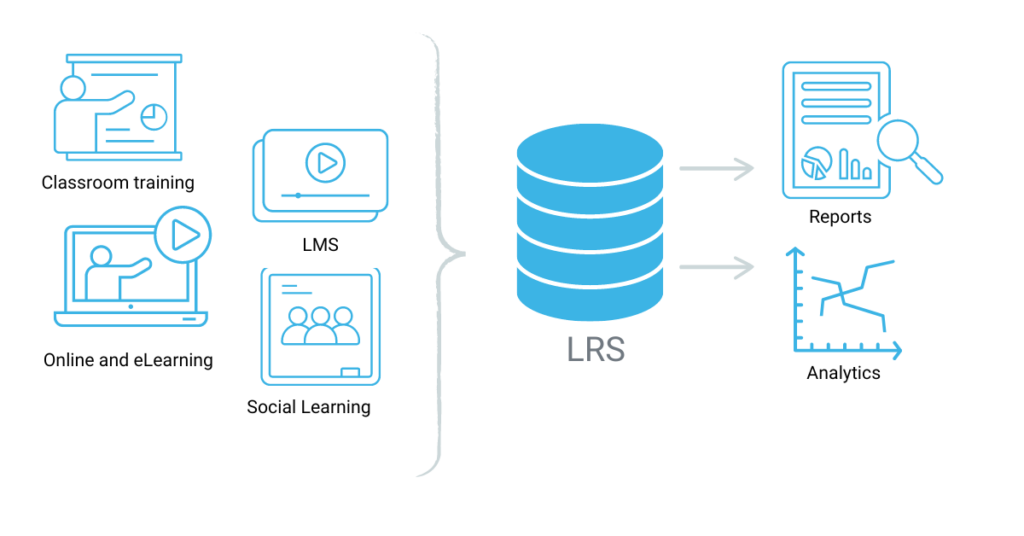
Tracking learning experiences and learning interactions with LRS.
Example of interactions xAPI captures
xAPI’s comprehensive tracking capability makes it a valuable tool for understanding and improving the learning and development process across various domains and industries. Here are some examples of experiences and activities that xAPI can track:
Online Course Activities
- Completion of eLearning courses.
- Viewing specific course modules or lessons.
- Taking quizzes or assessments.
- Interactions with multimedia elements (e.g., watching videos, interacting with simulations).
- Personalized learning pathways and recommendations based on interactions.
- How learners interact with content (e.g., time spent, mouse movements, clicks).
- Learners’ profiles, preferences, and context to tailor learning experiences.
- Interactions within simulations or serious games.
- Progress and decision-making within gamified learning experiences.
- Watching a microlearning video or completing a mini-lesson.
Offline Activities
- Attending in-person workshops or training sessions.
- Participating in hands-on labs or experiments.
- Fieldwork or on-the-job training experiences.
Social Learning
- Participation in discussion forums or online communities.
- Collaborative learning experiences, such as group projects or team activities.
- Peer assessments and feedback.
Performance Support
- Accessing job aids or reference materials.
- Using mobile apps or tools for on-the-job guidance.
- Troubleshooting or problem-solving activities.
- Reading articles or blog posts.
- Watching YouTube tutorials.
- Subscribing to podcasts or webinars.
- Compliance training completion.
Organizations can also define custom statements and extensions to track specific learning experiences unique to their needs like tracking the usage of specialized equipment or tools.
Examples of xAPI activity types
xAPI defines many standard verbs to describe actions or activities in statements that track learning experiences. Here’s a list of some commonly used standard xAPI verbs:
| LABEL | DESCRIPTION |
| abandoned | The session was abnormally terminated by a learner’s action (or due to a system failure). |
| answered | The actor replied to a question. |
| asked | An inquiry by an actor with the expectation of a response to a question. |
| attempted | Actor tried to access the object. An attempt statement without additional activities could be considered incomplete in some cases. |
| attended | The actor was present at a virtual or physical event or activity. |
| commented | The actor provided digital or written annotations on or about an object. |
| completed | The actor finished or concluded the activity normally. |
| enabled | The actor turned on a particular part or feature of the system. |
| exited | The actor intentionally departed from the activity or object. |
| experienced | The actor only encountered the object and is applicable in situations where a specific achievement or completion is not required. |
| failed | The actor did not successfully pass an activity to a level of predetermined satisfaction. |
| imported | The actor introduced an object into a physical or virtual location. |
| initialized | The activity provider has determined that the actor successfully started an activity. |
| interacted | The actor engaged with a physical or virtual object. |
| launched | The actor attempted to start an activity. |
| liked | The actor marked the object as an item of special interest. |
| mastered | The highest level of comprehension or competence the actor performed in an activity. |
| opened | The actor has opened the object. |
| passed | The actor successfully passed an activity to a level of predetermined satisfaction. |
| paused | The actor has ceased or suspended an activity temporarily. |
| performed offline | The actor has performed the object offline for a period of time (episode). |
| played | The actor spent some time enjoying the object. |
| preferred | The selected choices, favored options or settings of an actor in relation to an object or activity. |
| progressed | The actor has advanced or moved through an activity. |
| read | The actor read the object. |
| registered | The actor is officially enrolled or inducted in an activity. |
| reported | The actor announced the result of an experience or activity. |
| responded | The actor reacted or replied to an object. |
| resumed | The application has determined that the actor continued or reopened a suspended attempt on an activity. |
| scored | A numerical value related to an actor’s performance on an activity. |
| searched | The actor is or has searched for the object. If a target is specified, it indicates the context within which the search is or has been conducted. |
| selected | The actor selects an object from a collection or set to use it in an activity. |
| shared | The actor’s provided access to an object of common interest to others. |
| started | The actor has started the object. |
| suspended | The status of a temporarily halted activity when an actor’s intent is returning to the object or activity at a later time. |
| terminated | The actor successfully ended an activity. |
| viewed | The actor has viewed the object |
| watched | The actor has watched the object, such as a movie, a television show or a public performance. |
Looking for more information? The Tin-Can API registry is a good resource for valid xAPI verbs list and xAPI documentation.
Why track learning experiences
By tracking learning experiences, organizations can assess whether learners are meeting their learning objectives and goals, measure the effectiveness of training programs and ensure accountability for learning outcomes.
It also allows organizations to identify areas where learners are struggling, allocate resources more efficiently, implement adaptive learning and tailor content, resources, and activities based on individual learner preferences, strengths, and weaknesses.
Finally, for industries where a record of completed training is required, xAPI can be used for compliance reporting and certification purposes.
xAPI and analytics
xAPI-enabled courses allow organizations to measure the return on investment (ROI) for their training initiatives by tracking how learning experiences impact employee performance and overall business outcomes. It also can be used for comprehensive reporting to stakeholders, including executives, regulatory bodies, and accrediting organizations on the performance of the courses.
Here are 10 examples of analytics that can be derived from xAPI interactions:
- Completion Rates: Track the percentage of learners who complete a course or module.
- Time Spent: The time learners spend on different sections of a course can reveal which topics are engaging or challenging. It can also indicate if learners are progressing at an appropriate pace.
- User Progression Paths: By analyzing the sequence of xAPI statements, map the typical progression paths that learners follow through a course and optimize course content and navigation.
- Assessment Performance: Track how learners perform on assessments and quizzes, identify questions that are frequently answered incorrectly and assess effectiveness of assessments.
- Content Interaction: Record how often learners interact with various types of content, such as videos, simulations, or documents and the data to decide which types of content are most effective.
- Engagement Levels: Monitor the frequency and duration of learner interactions with learning materials to gauge learner engagement.
- Drop-off Points: Analyze where learners drop off or disengage from a course to identify areas that need improvement or additional support.
- Completion Times: Track the time it takes learners to complete a course or specific activities to reveal patterns in learner behavior.
- Peer Interactions: If social learning features are integrated, track interactions between learners, such as discussions, comments, and collaborations.
- Adaptive Learning Insights: Identify areas where adaptive learning interventions are needed, such as adjusting content difficulty or providing additional resources.
These are just a few examples of the types of analytics that can be derived from xAPI interactions. Remember that specific insights will depend on the goals of the learning program and the depth of data analysis performed.
FAQ about xAPI
What is xAPI used for?
xAPI is used for tracking and recording learning experiences—especially those that happen outside traditional Learning Management Systems (LMSs). It’s commonly used in e-learning, training programs, and corporate learning environments. xAPI is used to:
Track learning activities online and offline (e.g., reading a PDF, watching a video, attending a webinar, or using a mobile app).
Record experiences in the format of “Actor – Verb – Object” (e.g., “John completed Safety Training Module”).
Send these records to a Learning Record Store (LRS), which stores and manages the data.
Support interoperability between different learning platforms.
Common use cases are:
Monitoring compliance training (e.g., OSHA, HIPAA).
Measuring engagement across different learning tools.
Gathering insights on learner behavior and performance.
Integrating with virtual reality (VR), simulations, or mobile apps.
Replacing or enhancing older standards like SCORM.
What are xAPI examples?
Common xAPI use cases are:
Monitoring compliance training (e.g., OSHA, HIPAA).
Measuring engagement across different learning tools.
Gathering insights on learner behaviour and performance.
Integrating with virtual reality (VR), simulations, or mobile apps.
Replacing or enhancing older standards, like SCORM.
Is xAPI still relevant?
In the age of artificial intelligence, xAPI is not only relevant but increasingly important. Its core strength lies in its ability to collect detailed, structured data about learning experiences across a wide range of environments—online, offline, formal, and informal. This granular data becomes the fuel that powers AI systems in education and training.
xAPI is also uniquely suited to support the interoperability required in today’s fragmented digital learning ecosystem. AI-powered learning tools are now available across various platforms, including Learning Management Systems (LMSs), mobile apps, simulations, chatbots, and video learning platforms. Because xAPI can track and unify data from all these different tools into a single Learning Record Store (LRS), it enables AI algorithms to analyze a learner’s complete journey, not just isolated events within a single platform.
AI also enhances the value of xAPI by interpreting its data in more meaningful ways. While xAPI captures what happened (e.g., “Jordan completed a module”), AI can explore deeper questions such as why a learner may be struggling or what kind of content would help them progress. This synergy supports predictive analytics, intelligent feedback, and personalized learning paths—capabilities that are quickly becoming expected features in modern learning environments.
Finally, by feeding xAPI data into AI models, platforms can adjust the difficulty, pacing, or type of content in real-time to suit each learner’s needs. This dynamic approach is far more effective than static content delivery, making learning more engaging and effective.
What is xAPI vs SCORM?
| Feature | SCORM | xAPI (Tin Can API) |
|---|---|---|
| Release Year | 2001 (SCORM 1.2/2004) | 2013 |
| Data Captured | Limited (course completion, pass/fail, score, time spent) | Extensive (any learning activity or experience) |
| Tracking Scope | Only in-browser & LMS-based content | Tracks activities anywhere (online, offline, apps, simulations, etc.) |
| Offline Tracking | ❌ Not supported | ✅ Fully supported |
| Device/Platform Flexibility | Web-based, desktop LMS only | Any device: mobile, VR, simulations, etc. |
| Learning Record Storage | LMS only | Learning Record Store (LRS), separate from LMS |
| Interoperability | Limited to LMS and SCORM packages | Highly flexible across systems |
| Verb Structure | None | Actor–Verb–Object (e.g., “Alex completed module”) |
| Extensibility | Very limited | Fully extensible and customizable |
| Modern Use Case Fit | Basic eLearning | Adaptive learning, analytics, AI integration |
When to choose SCORM over xAPI?
Choose SCORM if you’re working in a traditional LMS environment with simple eLearning courses, and you don’t need to track anything beyond completion or quiz scores.
Choose xAPI if you want to support learning beyond the LMS, track diverse types of learning experiences (including offline), enable analytics, integrate with AI, or support adaptive/personalized learning.
About LEAi
LearnExperts has gained recognition for its cloud-based training content generation tool, LEAi. This innovative solution accelerates the creation of content for eLearning courses, instructor-led training (ILT), presentations, and videos. It also supports eLearning standards such as SCORM, cmi5 and xAPI. Contact us to learn more about xAPI compliance in LEAi.